A Raycaster on Bare Metal in x86 Assembly
I wanted to know what it actually takes to get 3D on a screen with nothing underneath it. No OS, no C runtime and no graphics library, just the BIOS, the CPU and the VGA card.
It ended up being about 3 KB. I wrote a raycaster, which is the same trick Wolfenstein 3D used back in 1992, as a disk image that the BIOS boots right into. It runs in 16-bit real mode at 320x200 with 256 colors, and you can walk around a small map with textured walls. The code is on GitHub as bootcaster if you want to mess with it.
My first version made every flat wall bulge out like I was looking through a peephole. Figuring out why was probably the most fun part of the whole project, so I’ll get to that.
Getting it to boot at all 
When a PC boots in legacy BIOS mode, the BIOS reads the first 512 bytes of the disk into memory at 0x7C00 and jumps there, and that’s about all it does for you. You’re in 16-bit real mode, the segment registers could be anything, and you can’t trust the stack. The BIOS doesn’t even check that what it loaded is code. It only checks that the last two bytes are 0x55 and 0xAA.
A raycaster isn’t going to fit in 512 bytes, so the boot sector just loads the rest of the program and jumps to it. The old way to read a disk uses cylinder, head and sector numbers, which I really didn’t want to deal with. Pretty much every BIOS from the last 25 years supports the INT 13h extensions, which let you read by plain sector number (LBA) instead. So the boot sector checks that the extensions are there and then calls AH=42h with a little 16-byte packet that says what to read and where to put it.
; Disk address packet for INT 13h AH=42h.
dap:
    db 0x10, 0
    dw STAGE2_SECTORS
    dw 0x7E00, 0            ; destination offset, segment
    dq 1                    ; first LBA: the sector right after this one
That loads everything after the boot sector to 0x7E00, which is right where the boot sector ends, and then a far jump sets CS to 0. The whole thing is one NASM file that pulls in the others with %include, and the assembler works out how many sectors to load from labels at the start and end of the program. I definitely would have forgotten to update that number at some point, so I’m glad I don’t have to.
Pixels and math 
Mode 13h is probably the easiest graphics mode there is. You call int 0x10 with AX=0x0013 and boom, the screen is just a flat 64,000-byte array at segment 0xA000. Each byte is one pixel and holds an index into a 256 color palette, and pixel (x, y) is at y * 320 + x. There are no bit planes or bank switching like the other VGA modes have.
If you draw straight into it you get tearing, since the card is sending it to the monitor while you’re in the middle of drawing a frame. So I draw into a back buffer in normal RAM at 0x20000, wait for the vertical retrace bit (bit 3 of port 0x3DA) to turn on, and then copy the whole buffer over with one rep movsd.
I didn’t want floating point anywhere in the per-frame code, so everything is fixed point. Positions and distances are 16.16, so the top 16 bits are whole tiles and the bottom 16 are the fraction, and 1.5 tiles is 0x00018000. Multiplying two of them is one instruction plus a shift to put the binary point back.
fixmul:
    imul ebx                ; EDX:EAX = EAX * EBX, a 32.32 result
    shrd eax, edx, 16       ; keep the middle 32 bits
    ret
Those are 32-bit registers in 16-bit code, which any 386 or newer lets you use in real mode. That made things a lot less painful.
Angles are binary angles, where a full turn is 65536. An angle fits in a 16-bit register and wraps around by itself when it overflows, which is nice for something that turns in circles constantly. Sine and cosine come from a 1024 entry table. I did cheat a little here since the x87 FPU is right there, so at boot I fill the table using fsin and never use the FPU again after that.
The first try (and the fisheye) 
The idea behind a raycaster is pretty simple. The world is a 2D grid where each cell is either empty or a wall. For each column of the screen you send a ray out from the player, find the first wall it hits, and draw a vertical strip that gets shorter the farther away the wall is. If you do that for all 320 columns you get something that looks 3D, even though everything underneath is 2D.
My first version did this the obvious way. I split a 60 degree field of view evenly across the 320 columns so each column had its own angle, and then moved each ray forward 1/32 of a tile at a time until it ended up inside a wall.
.march:
    add esi, [ray_dx]       ; ray_dx, ray_dy: 1/32 of a tile along the ray
    add edi, [ray_dy]
    add ecx, RAY_STEP       ; distance travelled
    call map_index
    mov al, [map + bx]
    test al, al
    jz .march
It worked and I could see walls, but it was slow and it looked wrong.
It was slow because the rays spend almost all their time crawling across empty floor 1/32 of a tile at a time. I added a step counter (make STATS=1 prints it to QEMU’s debug port), and one frame from the starting spot took 38,874 steps.
And it looked wrong like this:

That’s supposed to be a flat wall straight in front of you, but it bulges out in the middle and gets smaller toward the edges like a fisheye lens.
It took me a while to figure out that I was measuring the wrong distance. Each ray measured how far it traveled before it hit something, which seems like what you’d want. But think about a flat wall right in front of you. The ray in the middle of the screen hits it straight on, and a ray near the edge goes out at an angle, so it has to travel farther to reach the same wall. Farther away means shorter on screen, so the ends of the wall come out shorter than the middle even though the wall is flat.
If the wall is a distance
before it hits. At the edge of a 60 degree view
The distance you actually want is how far away the wall is in the direction the player is facing, and not the length of the ray. The usual fix is to multiply by
DDA 
Stepping in tiny fixed increments wastes a lot of time, because a wall can only start on a grid line and nothing happens in the middle of a tile. So instead of creeping forward you can jump straight from one grid line to the next.
That’s called DDA (digital differential analyzer), and it’s basically the same idea as drawing a line on a pixel grid. I followed the version in Lode Vandevenne’s raycasting tutorial, which is really good. Each ray keeps track of two numbers, how far along the ray the next vertical grid line is and how far the next horizontal one is. Whichever one is smaller is the line you cross next, so you step into that tile, add the spacing between lines of that kind to that number, and keep going until you hit a wall.
The spacing between two vertical grid lines, measured along the ray, is
div with EDX set to 1, and the inner loop doesn’t need any multiplies.
.step:
    mov eax, [side_x]
    cmp eax, [side_y]
    jae .step_y
    add eax, [delta_x]      ; next vertical line is closer: step in x
    mov [side_x], eax
    mov ax, [step_x]
    add [map_x], ax
    mov byte [side], 0
    jmp .check
.step_y:
    ; the same for y
Every step also lands exactly on a tile boundary, so a ray can’t slip through a wall by cutting across the corner of a tile like the 1/32 version could.
The other part of the fix is how you aim the rays. Instead of giving each column its own angle, the camera has a direction vector and a “camera plane” that’s perpendicular to it. The ray for a column is the direction plus some fraction of the plane, from -1 at the left edge of the screen to +1 at the right. The length of the plane sets the field of view, and I used 0.66 like the tutorial does, which comes out to about 66 degrees.
This fixes the fisheye because the direction has length 1 and the plane is perpendicular to it, so every ray moves exactly one unit forward (in the direction you’re facing) for each unit along the ray. That means the distance DDA gives you when it hits a wall is already the perpendicular distance, and there’s no cosine anywhere. Flat walls come out flat now.

From the starting spot the step count went from 38,874 per frame to 1,968, which is about 20 times fewer. From the spot in those screenshots it went from 21,670 to 839.
Keys, and a bug that wasn’t mine 
The BIOS keyboard call (INT 16h) gives you keystrokes, which is fine for typing but pretty useless for a game. You don’t get key-up events, and holding a key only repeats it after a delay, one key at a time, so you can’t walk and turn at the same time.
So I took over the keyboard interrupt myself. Every time a key goes down or up, the keyboard controller fires IRQ 1, which is interrupt vector 9 in real mode. My handler reads the scan code from port 0x60, where bit 7 says if it was a press or a release and the other 7 bits say which key. It writes a 1 or a 0 into a 128-byte table, tells the interrupt controller it’s done and returns, and the game loop just reads the table.
keyboard_irq:
    push ax
    push bx
    in al, 0x60
    cmp al, 0xE0            ; arrow keys send this prefix first
    je .done
    xor bx, bx
    mov bl, al
    and bl, 0x7F
    shr al, 7
    xor al, 1               ; 1 = down, 0 = up
    mov [cs:keys + bx], al
.done:
    mov al, 0x20
    out 0x20, al            ; end of interrupt
    pop bx
    pop ax
    iret
I lost a good amount of time here to a bug that wasn’t even in my code. I test everything in QEMU by scripting its monitor to press keys and take screenshots, and after one long key press every key I sent after it just disappeared, including Esc. I logged scan codes in the handler and dumped the CPU registers and the interrupt controller state, and all of it looked fine. Eventually I found out that QEMU’s sendkey waits out the hold time after the press and again after the release, and queues everything else up behind it. So the keys were never lost, they were just showing up late.
The first version also moved you a fixed amount every frame, so the faster the computer was, the faster you walked. To fix that I set the 8254 timer chip to interrupt 1,000 times a second (you load it with 1193, since its input clock is 1.193182 MHz) and pointed IRQ 0 at a handler that just increments a counter. Each frame checks how many milliseconds passed since the last one and scales movement and turning by that. It’s capped at 50 ms so one slow frame can’t throw you through a wall.
Walking speed is supposed to be 3 tiles a second, and holding forward for one second in QEMU moved me from x = 2.5 to about 5.4, which is close enough for me.
Textures 
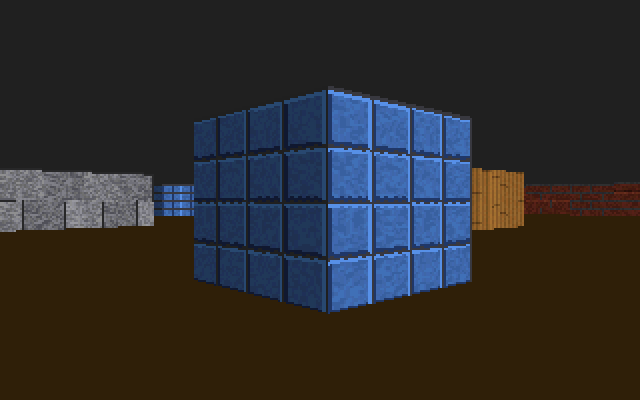
The solid colored walls in those screenshots are fine, but I wanted it to look more like Wolfenstein. I also didn’t want to store image files on the disk, so the four wall textures (brick, stone, tile and wood) are 64x64 and get generated at boot one texel at a time.
The grainy look comes from a 16-bit Galois LFSR. It’s a shift register where every time a 1 falls off the end you XOR a constant back in, and with the right constant (0xB400 here) it goes through all 65,535 nonzero values before it repeats. In software it’s three instructions, and in hardware it’s sixteen flip-flops and a few XOR gates, which is why the same circuit shows up all over the place in CRCs and scramblers. I thought it was kind of funny to use it to make bricks look dirty.
The colors are my own palette, written straight to the VGA DAC. You send a starting index to port 0x3C8 and then red, green and blue for each color to port 0x3C9. Colors 0 to 127 are four ramps of 32 shades, one per material, and 128 to 255 are the same ramps at half brightness. That makes shading basically free. Every wall that faces along y gets bit 7 set on each texel with one or, so it comes out darker, and two walls that meet at a corner are always different shades, which makes corners a lot easier to see.
Picking which column of the texture to draw is the one spot where DDA needs a multiply. The perpendicular distance times the ray, plus the player’s position, gives the exact point where the ray hit the wall. The fractional part of that is how far along the wall you are, and its top 6 bits give a column from 0 to 63. Then you go down that column at 64 / wall height texels per pixel.
Where it’s at 
The disk image is 3,072 bytes. In QEMU without hardware acceleration it runs at around 42 to 51 frames a second, but that is probably more due to QEMU’s emulation than if I had run it on real hardware. In principle you could write it to a USB stick and boot it on anything with a legacy BIOS mode, though I haven’t tested it.
I was surprised how little of this was really about assembly. The parts that mattered most were the choices about how to store things, like using binary angles so rotation wraps by itself, fixed point so a multiply is one instruction, the camera plane so I didn’t need a cosine, and DDA so the loop only stops at grid lines. The fisheye version didn’t actually have a bug in it either. The code did exactly what I wrote, I had just picked the wrong distance to measure.